> ## Documentation Index
> Fetch the complete documentation index at: https://training-docs.cerebras.ai/llms.txt
> Use this file to discover all available pages before exploring further.
# Automatic Microbatching
> Learn how to optimize performance by configuring the Trainer with automatic microbatching.
When using this feature, the gradients from each microbatch are accumulated before the weight update, so the model still operates on the total global batch size. If there are no gradients (i.e. non-training runs), you can still use microbatching to improve performance.
You can configure microbatching through the Trainer YAML file or Python code. Both approaches use the [`GlobalFlags`](https://training-api.cerebras.ai/en/latest/wsc/Model-zoo/api/generated/cerebras.modelzoo.trainer.callbacks.html#cerebras.modelzoo.trainer.callbacks.GlobalFlags) or [`ScopedTrainFlags`](https://training-api.cerebras.ai/en/latest/wsc/Model-zoo/api/generated/cerebras.modelzoo.trainer.callbacks.html#scopedtrainflags) callback. Learn more about these callbacks in [Performance Flags](../../../../rel-2.5.0/model-zoo/components/trainer-components/performance-flags)
We have two guides depending on your familiarity with microbatching. We recommend reading the rest of this guide before moving on to the beginner or advanced guides:
* [**Beginner Guide:**](../../../rel-2.5.0/model-zoo/tutorials/microbatching-beginner) Covers how to set Global Batch Size (GBS) and how to use training modes.
* [**Advanced Guide:**](../../../rel-2.5.0/model-zoo/tutorials/microbatching-advanced) Covers how the platform picks or overrides Micro Batch Size (MBS) and how to optimize it manually.
Read [Trainer Essentials](../../model-zoo/trainer-configuration-overview), which provides a basic overview of how to configure and use the [`Trainer`](https://training-api.cerebras.ai/en/latest/wsc/Model-zoo/api/index.html#cerebras.modelzoo.Trainer).
## How It Works
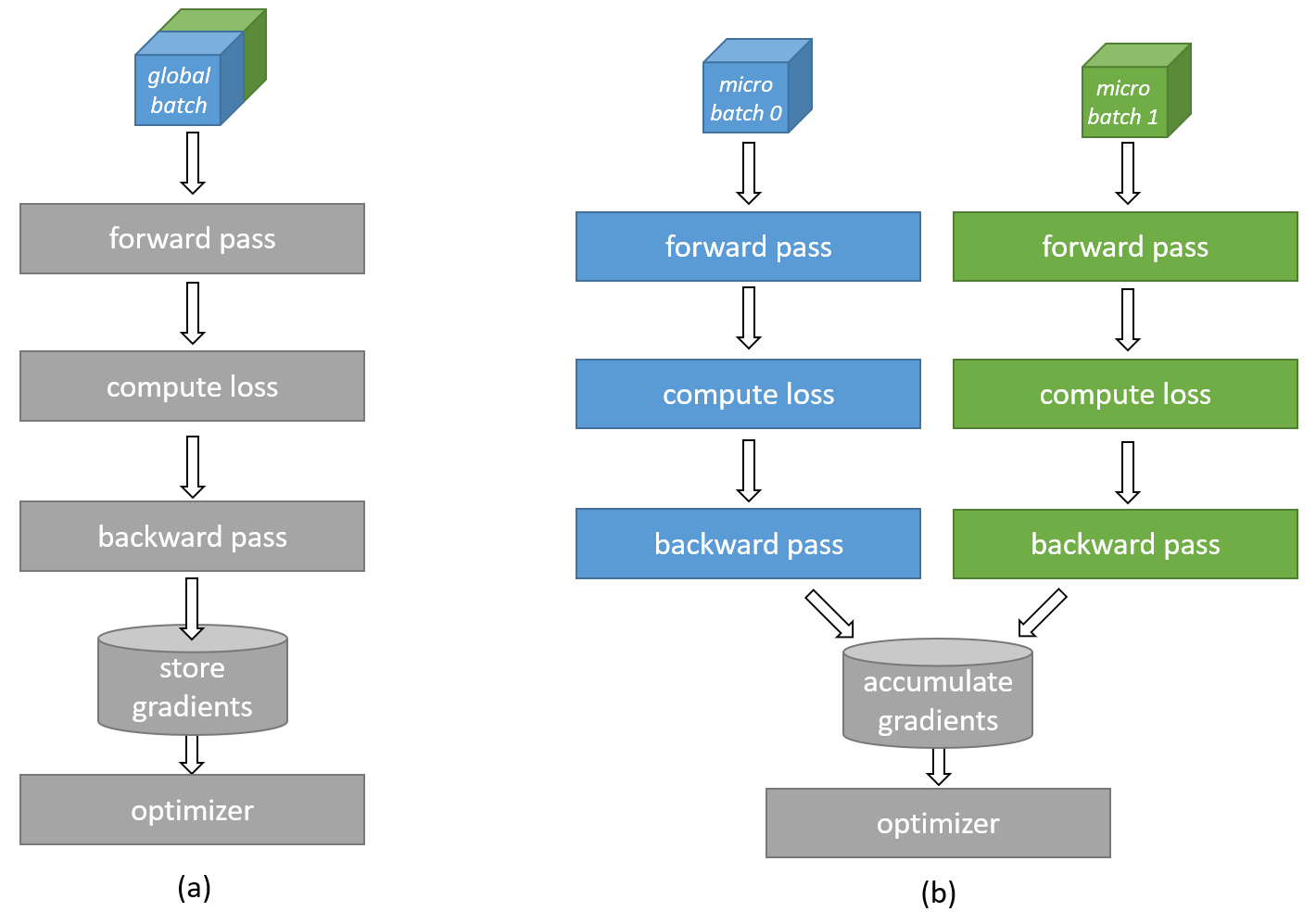
Microbatching divides large training batches into smaller portions, allowing models to process batch sizes that exceed available device memory. The Cerebras software stack facilitates automatic microbatching for transformer models without requiring any modifications to the model code. Additionally, the software can automatically determine optimal microbatch sizes.
As illustrated in the figure below, when a batch exceeds memory limits it's segmented into manageable microbatches that are processed sequentially. The system accumulates gradients across these microbatches before updating network weights, effectively simulating training with the full batch size. Statistics like loss can be combined across microbatches in a similar way.
 The Cerebras implementation intelligently distributes workloads even when:
* The `batch_size` isn't divisible by `num_csx`
* The per-system batch size isn't divisible by the `micro_batch_size`
This means there is no need to change the global batch size when scaling the number of Cerebras CS-X systems up or down. This behaviour is controlled via the `micro_batch_size` parameter in the YAML config file.
## Key Parameters
Some of these paramters are derived by the system.
(integer value) Specifies the number of Cerebras CS-X systems (e.g. CS-2s, CS-3s, etc) used for the model training run.
(integer value) Specifies the *global* batch size (GBS) of the model before the model is split along the batch dimension across `num_csx` systems or into micro batches. This parameter must be larger than `num_csx`.
This term is defined implicitly as `Ceil(⌈batch_size / num_csx⌉)` and represents the size of the batch used on each Cerebras system. This is calculated internally by the tool and no action is required.
Controls the MBS that will be used on each Cerebras system. Choose from:
| YAML Setting | Description |
| ---------------- | ---------------------------------------------------------------------------------------------------------------------------------------------------------------------------------------------------------------------------------------------------------------------------------------------------------------- |
| `auto` | Set this to find a *reasonable* MBS automatically. Compiles faster than `explore` but may select less optimal values. This is the default when `micro_batch_size` is not specified. |
| `explore` | Set this to search exhaustively for the *best* MBS for speed. This takes much longer to compile and works only in `compile_only` mode. Unlike `auto`, it evaluates all possible micro-batch sizes regardless of divisibility by `batch_size/num_csx`. |
| `` | Recommended when you know the optimal value (use `auto` or `explore` above to determine this), as it substantially reduces compilation time. The compiler may slightly adjust your specified value to ensure even workload distribution across CS-X systems, and will notify you if adjustments are made. |
| `none` | Disable microbatching and use the global `batch_size` parameter as the microbatch size. This may result in the model with the given batch size being too large to fit into device memory, in which case compilation will fail. If it does fit, however, the chosen batch size may be suboptimal for performance. |
Implicitly defined as:
`NumMicroBatches = Ceil(per-system batch size / micro_batch_size)`
This value helps determine which `micro_batch_size` settings are valid. Since the smallest allowed MBS is 1, the maximum number of microbatches equals the per-system batch size. So, the valid range for `NumMicroBatches` is:
`{1, 2, ..., per-system batch size}`
To find all valid `micro_batch_size` values, divide the per-system batch size by each number in this range and take the ceiling of the result. The resulting set of values are the supported MBS options.
If your specified MBS is not in the supported MBS options set the Cerebras software stack will issue a warning message and will automatically override the given MBS with the closest supported value from the set.
## Limitations
* Microbatching has been thoroughly tested mainly with transformer models. The technique is not compatible with models that incorporate batch normalization or layers that execute non-linear computations across batches.
* The functionality of Automatic Batch Exploration is confined to transformer models. Attempting to apply it to vision networks, such as CNNs, will result in a runtime error.
* To circumvent extended compile times, it’s advisable to directly assign a known effective value to the `micro_batch_size` parameter instead of leaving it undefined.
* Enabling Automatic Batch Exploration by setting `micro_batch_size` to “explore” initiates an exhaustive search, potentially extending over several hours. However, the typical compile time for most GPT models is expected to be around one hour.
The Cerebras implementation intelligently distributes workloads even when:
* The `batch_size` isn't divisible by `num_csx`
* The per-system batch size isn't divisible by the `micro_batch_size`
This means there is no need to change the global batch size when scaling the number of Cerebras CS-X systems up or down. This behaviour is controlled via the `micro_batch_size` parameter in the YAML config file.
## Key Parameters
Some of these paramters are derived by the system.
(integer value) Specifies the number of Cerebras CS-X systems (e.g. CS-2s, CS-3s, etc) used for the model training run.
(integer value) Specifies the *global* batch size (GBS) of the model before the model is split along the batch dimension across `num_csx` systems or into micro batches. This parameter must be larger than `num_csx`.
This term is defined implicitly as `Ceil(⌈batch_size / num_csx⌉)` and represents the size of the batch used on each Cerebras system. This is calculated internally by the tool and no action is required.
Controls the MBS that will be used on each Cerebras system. Choose from:
| YAML Setting | Description |
| ---------------- | ---------------------------------------------------------------------------------------------------------------------------------------------------------------------------------------------------------------------------------------------------------------------------------------------------------------- |
| `auto` | Set this to find a *reasonable* MBS automatically. Compiles faster than `explore` but may select less optimal values. This is the default when `micro_batch_size` is not specified. |
| `explore` | Set this to search exhaustively for the *best* MBS for speed. This takes much longer to compile and works only in `compile_only` mode. Unlike `auto`, it evaluates all possible micro-batch sizes regardless of divisibility by `batch_size/num_csx`. |
| `` | Recommended when you know the optimal value (use `auto` or `explore` above to determine this), as it substantially reduces compilation time. The compiler may slightly adjust your specified value to ensure even workload distribution across CS-X systems, and will notify you if adjustments are made. |
| `none` | Disable microbatching and use the global `batch_size` parameter as the microbatch size. This may result in the model with the given batch size being too large to fit into device memory, in which case compilation will fail. If it does fit, however, the chosen batch size may be suboptimal for performance. |
Implicitly defined as:
`NumMicroBatches = Ceil(per-system batch size / micro_batch_size)`
This value helps determine which `micro_batch_size` settings are valid. Since the smallest allowed MBS is 1, the maximum number of microbatches equals the per-system batch size. So, the valid range for `NumMicroBatches` is:
`{1, 2, ..., per-system batch size}`
To find all valid `micro_batch_size` values, divide the per-system batch size by each number in this range and take the ceiling of the result. The resulting set of values are the supported MBS options.
If your specified MBS is not in the supported MBS options set the Cerebras software stack will issue a warning message and will automatically override the given MBS with the closest supported value from the set.
## Limitations
* Microbatching has been thoroughly tested mainly with transformer models. The technique is not compatible with models that incorporate batch normalization or layers that execute non-linear computations across batches.
* The functionality of Automatic Batch Exploration is confined to transformer models. Attempting to apply it to vision networks, such as CNNs, will result in a runtime error.
* To circumvent extended compile times, it’s advisable to directly assign a known effective value to the `micro_batch_size` parameter instead of leaving it undefined.
* Enabling Automatic Batch Exploration by setting `micro_batch_size` to “explore” initiates an exhaustive search, potentially extending over several hours. However, the typical compile time for most GPT models is expected to be around one hour.