> ## Documentation Index
> Fetch the complete documentation index at: https://training-docs.cerebras.ai/llms.txt
> Use this file to discover all available pages before exploring further.
# Read Hooks
> This guide details various read hooks you can use to convert different types of raw input data into HDF5 format for machine learning tasks on Cerebras Systems.
## What is a Read Hook?
We use read hooks to convert from different input formats to HDF5 format. Pre-built hooks are provided for standard input formats and masking schemes.
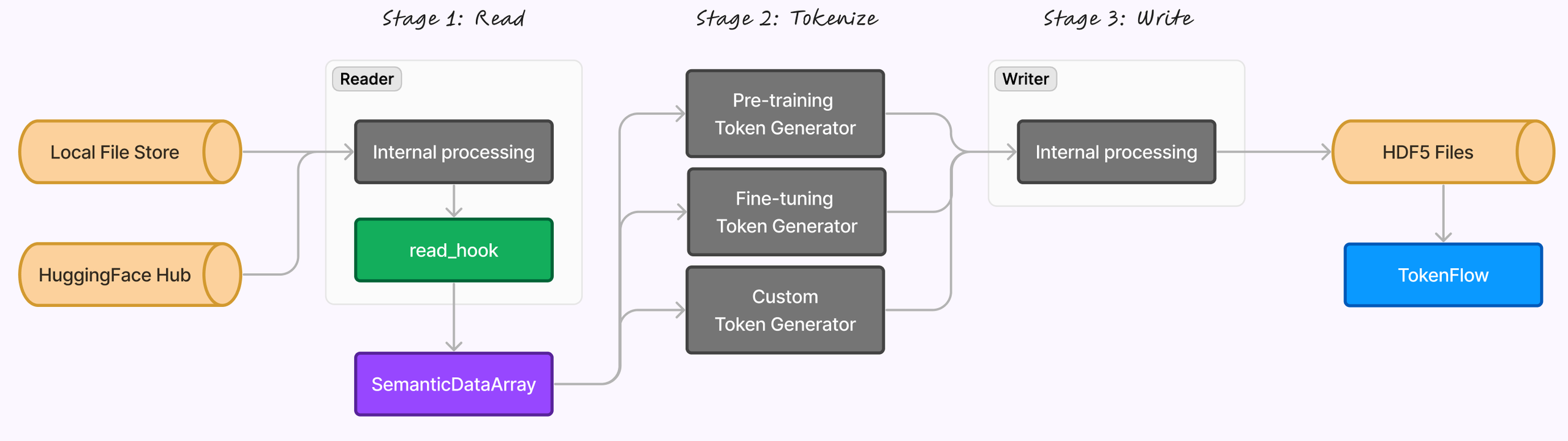 Our end-to-end data processing pipeline, pictured above, consists of three stages:
Data is sourced from either a local file store or the Hugging Face Hub and processed by the Reader module, which applies a `read_hook` before converting the data into a `SemanticDataArray`.
The data is then transformed using one of three token generators—pre-training, fine-tuning, or custom—depending on the use case.
The processed tokens undergo internal processing via the Writer module and are stored in HDF5 format, forming the `TokenFlow`. This structured approach ensures efficient handling and tokenization of input data for downstream tasks.
This guide explores how to configure and utilize pre-built read hooks to streamline data preprocessing across different data types and platforms, enabling more robust and adaptable machine learning pipelines.
By mastering read hooks, you'll gain the ability to:
* Seamlessly integrate local and HuggingFace data sources
* Customize data loading for specific tasks
* Optimize preprocessing efficiency
* Enhance overall model performance
See [Write a Custom Read Hook](../../../model-zoo/components/data-preprocessing/semantic-regions) to learn how to create your own.
## Fine-tuning LLaVA Hook
This read hook processes conversation data to format it for fine-tuning LLaVA models. It looks for conversation turns, optional system prompts, and images. It requires keys for conversation data and image paths.
```yaml Config Example theme={null}
read_hook: "cerebras.modelzoo.data_preparation.data_preprocessing.hooks.finetuning_llava_hook"
read_hook_kwargs:
multi_turn_key: "conversation"
image_key: "image_path"
image_token: ""
multi_turn_role_key: "from"
multi_turn_content_key: "value"
phase: 2
```
```yaml Return Structure theme={null}
[
{
"type": "system",
"content": [{"text": "A chat between a curious human and an artificial intelligence assistant. "
"The assistant gives helpful, detailed, and polite answers to the human's questions."}]
},
{
"type": "user",
"content": [
{"image": "path/to/image.jpg"},
{"text": "User's text before and after image"}
],
"semantic_drop_mask": [False, False]
},
{
"type": "assistant",
"content": [{"text": "Assistant's response"}],
"semantic_drop_mask": [False]
}
]
```
## Pretraining Text Hook
This read hook extracts and processes plain text data for reading tasks. It requires a key to extract text from input data.
```yaml Config Example theme={null}
read_hook: "cerebras.modelzoo.data_preparation.data_preprocessing.hooks.text_read_hook"
read_hook_kwargs:
text_key: "text"
```
```yaml Return Structure theme={null}
[
{
"content": [
{"text": "Extracted text data"}
]
}
]
```
## Pretraining Image Captions Hook
This read hook prepares data for image captioning pretraining tasks by extracting image paths and captions.
```yaml Config Example theme={null}
read_hook: "cerebras.modelzoo.data_preparation.data_preprocessing.hooks.pretraining_image_captions_hook"
read_hook_kwargs:
image_key: "image"
caption_key: "caption"
```
```yaml Return Structure theme={null}
[
{
"content": [
{"image": "Path to the image"},
{"text": "Caption describing the image"}
]
}
]
```
## NLG Hook
This read hook processes natural language generation (NLG) data, organizing context and completion information into a structured format. It requires context and completion keys.
```yaml Config Example theme={null}
read_hook: "cerebras.modelzoo.data_preparation.data_preprocessing.hooks.nlg_read_hook"
read_hook_kwargs:
context_key: "context"
completion_key: "completion"
```
```yaml Return Structure theme={null}
[
{
"type": "context",
"content": [
{"text": "Context of the conversation"}
]
},
{
"type": "completion",
"content": [
{"text": "Generated response"}
]
}
]
```
## Prompt Completion Text Hook
This read hook formats prompt and completion text into a structured list. It requires prompt and completion keys.
```yaml Config Example theme={null}
read_hook: "cerebras.modelzoo.data_preparation.data_preprocessing.hooks.prompt_completion_text_read_hook"
read_hook_kwargs:
prompt_key: "prompt"
completion_key: "completion"
```
```yaml Return Structure theme={null}
[
{
"type": "prompt",
"content": [
{"text": "Prompt text"}
]
},
{
"type": "completion",
"content": [
{"text": "Completion text"}
]
}
]
```
## Chat Hook
This read hook transforms chat data into a semantic data array, distinguishing between user and assistant roles. Assumes data is in conversation format and requires a key for multi-turn content if the data is not in OpenAI ChatML format.
```yaml Config Example theme={null}
read_hook: "cerebras.modelzoo.data_preparation.data_preprocessing.hooks.chat_read_hook"
read_hook_kwargs:
multi_turn_key: "messages"
multi_turn_role_key: "role"
multi_turn_content_key: "content"
```
```yaml Return Structure theme={null}
[
{"type": "user", "content": [{"text": "User message"}]},
{"type": "assistant", "content": [{"text": "Assistant message"}]}
]
```
## DPO Hook
This read hook structures data for Direct Preference Optimization (DPO) tasks, organizing prompts, chosen responses, and rejected responses into semantic data array. Requires keys for prompt, chosen, and rejected data. The implementation can be found [here](https://github.com/Cerebras/modelzoo/tree/main/src/cerebras/modelzoo//data_preparation/data_preprocessing/hooks.py#L331).
```yaml Config Example theme={null}
read_hook: "cerebras.modelzoo.data_preparation.data_preprocessing.hooks.dpo_read_hook"
read_hook_kwargs:
prompt_key: "prompt"
chosen_key: "chosen"
rejected_key: "rejected"
assistant_role: "assistant:"
```
```yaml Return Structure theme={null}
[
{"type": "prompt", "content": [{"text": "Prompt text"}]},
{"type": "chosen", "content": [{"text": "Chosen response"}]},
{"type": "rejected", "content": [{"text": "Rejected response"}]}
]
```
## Prompt Completion Chat Hook
This read hook processes prompt and completion data as a single turn chat and creates a semantic data array format. The implementation can be found [here](https://github.com/Cerebras/modelzoo/tree/main/src/cerebras/modelzoo//data_preparation/data_preprocessing/hooks.py#L433).
```yaml Config Example theme={null}
read_hook: "cerebras.modelzoo.data\_preparation.data\_preprocessing.hooks.prompt\_completion\_chat\_read\_hook"
read\_hook\_kwargs:
prompt_key: "prompt"
completion_key: "completion"
```
```yaml Return Structure theme={null}
[
{
"type": "user",
"content": [
{"text": "User's prompt text"}
]
},
{
"type": "assistant",
"content": [
{"text": "Assistant's completion text"}
]
}
]
```
## Fine-Tuning Image Captions Hook
Processes fine-tuning image captions data into a semantic data array format. Requires keys for image and caption data. The hook implementation can be found [here](https://github.com/Cerebras/modelzoo/tree/main/src/cerebras/modelzoo//data_preparation/data_preprocessing/hooks.py#L473).
```yaml Config Example theme={null}
read_hook: "cerebras.modelzoo.data_preparation.data_preprocessing.hooks.finetuning_image_captions_hook"
read_hook_kwargs:
image_key: "image"
caption_key: "caption"
```
```yaml Return Structure theme={null}
[
{
"type": "prompt",
"content": [
{"image": "Path to the image"}
]
},
{
"type": "completion",
"content": [
{"text": "Caption describing the image"}
]
}
]
```
## Fine-Tuning LLaVA Hook Prompt Completion
This read hook transforms conversation data for fine-tuning LLaVA, alternating between prompt and completion roles. Requires keys for conversation data and image paths. The hook implementation can be found [here](https://github.com/Cerebras/modelzoo/tree/main/src/cerebras/modelzoo//data_preparation/data_preprocessing/hooks.py#L530).
```yaml Config Example theme={null}
read_hook: "cerebras.modelzoo.data_preparation.data_preprocessing.hooks.finetuning_llava_hook_prompt_completion"
read_hook_kwargs:
multi_turn_key: "conversation"
multi_turn_role_key: "role"
multi_turn_content_key: "content"
image_key: "image_path"
image_token: ""
phase: 1
```
```yaml Return Structure theme={null}
[
{
"type": "system",
"content": [{"text": "A chat between a curious human and an artificial intelligence "
"assistant. The assistant gives helpful, detailed, and polite answers "
"to the human's questions."}]
},
{
"type": "prompt",
"content": [
{"image": "path/to/image.jpg"},
{"text": "User's text before and after image"}
],
"semantic_drop_mask": [False, True]
},
{
"type": "completion",
"content": [{"text": "Assistant's response"}],
"semantic_drop_mask": [False]
}
]
```
## Important Considerations
* **Handling keys to read data**: The `read_hook_kwargs` property must have data keys with the suffix `_key` to segregate these from other parameters for `read_hook_kwargs`. These keys will be exclusively used to read data from the input while other parameters which are not data keys will be used to create semantic data array from the read hooks.
* **Space Handling**: When combining custom regions, the data processor does not add any spaces or separators between the regions. Space handling must be managed within the read hooks. When creating custom semantic regions, ensure there is a leading space at the start of each region (except the first) to prevent the merging of words from neighboring regions.
* **Multimodal Datasets**: When working with multimodal datasets, if images are provided as URLs, the hooks should download the images and generate image paths to be used by the multimodal models.
* **Separator Handling With Prompt Completion Read Hook**: The token generator adds a separator token between `prompt` and `completion` semantic regions. The tokenizer’s `sep_token` attribute is used as a separator token if present; else we use `<|sep|>`.
## What’s Next?
Now that you’ve configured your input data and understand how to process it using various read hooks, the next step is to set up your [token generators](../../../model-zoo/components/data-preprocessing/token-generators). Token generators play a crucial role in the preprocessing pipeline, as they convert raw data into tokenized formats suitable for machine learning models.
Our end-to-end data processing pipeline, pictured above, consists of three stages:
Data is sourced from either a local file store or the Hugging Face Hub and processed by the Reader module, which applies a `read_hook` before converting the data into a `SemanticDataArray`.
The data is then transformed using one of three token generators—pre-training, fine-tuning, or custom—depending on the use case.
The processed tokens undergo internal processing via the Writer module and are stored in HDF5 format, forming the `TokenFlow`. This structured approach ensures efficient handling and tokenization of input data for downstream tasks.
This guide explores how to configure and utilize pre-built read hooks to streamline data preprocessing across different data types and platforms, enabling more robust and adaptable machine learning pipelines.
By mastering read hooks, you'll gain the ability to:
* Seamlessly integrate local and HuggingFace data sources
* Customize data loading for specific tasks
* Optimize preprocessing efficiency
* Enhance overall model performance
See [Write a Custom Read Hook](../../../model-zoo/components/data-preprocessing/semantic-regions) to learn how to create your own.
## Fine-tuning LLaVA Hook
This read hook processes conversation data to format it for fine-tuning LLaVA models. It looks for conversation turns, optional system prompts, and images. It requires keys for conversation data and image paths.
```yaml Config Example theme={null}
read_hook: "cerebras.modelzoo.data_preparation.data_preprocessing.hooks.finetuning_llava_hook"
read_hook_kwargs:
multi_turn_key: "conversation"
image_key: "image_path"
image_token: ""
multi_turn_role_key: "from"
multi_turn_content_key: "value"
phase: 2
```
```yaml Return Structure theme={null}
[
{
"type": "system",
"content": [{"text": "A chat between a curious human and an artificial intelligence assistant. "
"The assistant gives helpful, detailed, and polite answers to the human's questions."}]
},
{
"type": "user",
"content": [
{"image": "path/to/image.jpg"},
{"text": "User's text before and after image"}
],
"semantic_drop_mask": [False, False]
},
{
"type": "assistant",
"content": [{"text": "Assistant's response"}],
"semantic_drop_mask": [False]
}
]
```
## Pretraining Text Hook
This read hook extracts and processes plain text data for reading tasks. It requires a key to extract text from input data.
```yaml Config Example theme={null}
read_hook: "cerebras.modelzoo.data_preparation.data_preprocessing.hooks.text_read_hook"
read_hook_kwargs:
text_key: "text"
```
```yaml Return Structure theme={null}
[
{
"content": [
{"text": "Extracted text data"}
]
}
]
```
## Pretraining Image Captions Hook
This read hook prepares data for image captioning pretraining tasks by extracting image paths and captions.
```yaml Config Example theme={null}
read_hook: "cerebras.modelzoo.data_preparation.data_preprocessing.hooks.pretraining_image_captions_hook"
read_hook_kwargs:
image_key: "image"
caption_key: "caption"
```
```yaml Return Structure theme={null}
[
{
"content": [
{"image": "Path to the image"},
{"text": "Caption describing the image"}
]
}
]
```
## NLG Hook
This read hook processes natural language generation (NLG) data, organizing context and completion information into a structured format. It requires context and completion keys.
```yaml Config Example theme={null}
read_hook: "cerebras.modelzoo.data_preparation.data_preprocessing.hooks.nlg_read_hook"
read_hook_kwargs:
context_key: "context"
completion_key: "completion"
```
```yaml Return Structure theme={null}
[
{
"type": "context",
"content": [
{"text": "Context of the conversation"}
]
},
{
"type": "completion",
"content": [
{"text": "Generated response"}
]
}
]
```
## Prompt Completion Text Hook
This read hook formats prompt and completion text into a structured list. It requires prompt and completion keys.
```yaml Config Example theme={null}
read_hook: "cerebras.modelzoo.data_preparation.data_preprocessing.hooks.prompt_completion_text_read_hook"
read_hook_kwargs:
prompt_key: "prompt"
completion_key: "completion"
```
```yaml Return Structure theme={null}
[
{
"type": "prompt",
"content": [
{"text": "Prompt text"}
]
},
{
"type": "completion",
"content": [
{"text": "Completion text"}
]
}
]
```
## Chat Hook
This read hook transforms chat data into a semantic data array, distinguishing between user and assistant roles. Assumes data is in conversation format and requires a key for multi-turn content if the data is not in OpenAI ChatML format.
```yaml Config Example theme={null}
read_hook: "cerebras.modelzoo.data_preparation.data_preprocessing.hooks.chat_read_hook"
read_hook_kwargs:
multi_turn_key: "messages"
multi_turn_role_key: "role"
multi_turn_content_key: "content"
```
```yaml Return Structure theme={null}
[
{"type": "user", "content": [{"text": "User message"}]},
{"type": "assistant", "content": [{"text": "Assistant message"}]}
]
```
## DPO Hook
This read hook structures data for Direct Preference Optimization (DPO) tasks, organizing prompts, chosen responses, and rejected responses into semantic data array. Requires keys for prompt, chosen, and rejected data. The implementation can be found [here](https://github.com/Cerebras/modelzoo/tree/main/src/cerebras/modelzoo//data_preparation/data_preprocessing/hooks.py#L331).
```yaml Config Example theme={null}
read_hook: "cerebras.modelzoo.data_preparation.data_preprocessing.hooks.dpo_read_hook"
read_hook_kwargs:
prompt_key: "prompt"
chosen_key: "chosen"
rejected_key: "rejected"
assistant_role: "assistant:"
```
```yaml Return Structure theme={null}
[
{"type": "prompt", "content": [{"text": "Prompt text"}]},
{"type": "chosen", "content": [{"text": "Chosen response"}]},
{"type": "rejected", "content": [{"text": "Rejected response"}]}
]
```
## Prompt Completion Chat Hook
This read hook processes prompt and completion data as a single turn chat and creates a semantic data array format. The implementation can be found [here](https://github.com/Cerebras/modelzoo/tree/main/src/cerebras/modelzoo//data_preparation/data_preprocessing/hooks.py#L433).
```yaml Config Example theme={null}
read_hook: "cerebras.modelzoo.data\_preparation.data\_preprocessing.hooks.prompt\_completion\_chat\_read\_hook"
read\_hook\_kwargs:
prompt_key: "prompt"
completion_key: "completion"
```
```yaml Return Structure theme={null}
[
{
"type": "user",
"content": [
{"text": "User's prompt text"}
]
},
{
"type": "assistant",
"content": [
{"text": "Assistant's completion text"}
]
}
]
```
## Fine-Tuning Image Captions Hook
Processes fine-tuning image captions data into a semantic data array format. Requires keys for image and caption data. The hook implementation can be found [here](https://github.com/Cerebras/modelzoo/tree/main/src/cerebras/modelzoo//data_preparation/data_preprocessing/hooks.py#L473).
```yaml Config Example theme={null}
read_hook: "cerebras.modelzoo.data_preparation.data_preprocessing.hooks.finetuning_image_captions_hook"
read_hook_kwargs:
image_key: "image"
caption_key: "caption"
```
```yaml Return Structure theme={null}
[
{
"type": "prompt",
"content": [
{"image": "Path to the image"}
]
},
{
"type": "completion",
"content": [
{"text": "Caption describing the image"}
]
}
]
```
## Fine-Tuning LLaVA Hook Prompt Completion
This read hook transforms conversation data for fine-tuning LLaVA, alternating between prompt and completion roles. Requires keys for conversation data and image paths. The hook implementation can be found [here](https://github.com/Cerebras/modelzoo/tree/main/src/cerebras/modelzoo//data_preparation/data_preprocessing/hooks.py#L530).
```yaml Config Example theme={null}
read_hook: "cerebras.modelzoo.data_preparation.data_preprocessing.hooks.finetuning_llava_hook_prompt_completion"
read_hook_kwargs:
multi_turn_key: "conversation"
multi_turn_role_key: "role"
multi_turn_content_key: "content"
image_key: "image_path"
image_token: ""
phase: 1
```
```yaml Return Structure theme={null}
[
{
"type": "system",
"content": [{"text": "A chat between a curious human and an artificial intelligence "
"assistant. The assistant gives helpful, detailed, and polite answers "
"to the human's questions."}]
},
{
"type": "prompt",
"content": [
{"image": "path/to/image.jpg"},
{"text": "User's text before and after image"}
],
"semantic_drop_mask": [False, True]
},
{
"type": "completion",
"content": [{"text": "Assistant's response"}],
"semantic_drop_mask": [False]
}
]
```
## Important Considerations
* **Handling keys to read data**: The `read_hook_kwargs` property must have data keys with the suffix `_key` to segregate these from other parameters for `read_hook_kwargs`. These keys will be exclusively used to read data from the input while other parameters which are not data keys will be used to create semantic data array from the read hooks.
* **Space Handling**: When combining custom regions, the data processor does not add any spaces or separators between the regions. Space handling must be managed within the read hooks. When creating custom semantic regions, ensure there is a leading space at the start of each region (except the first) to prevent the merging of words from neighboring regions.
* **Multimodal Datasets**: When working with multimodal datasets, if images are provided as URLs, the hooks should download the images and generate image paths to be used by the multimodal models.
* **Separator Handling With Prompt Completion Read Hook**: The token generator adds a separator token between `prompt` and `completion` semantic regions. The tokenizer’s `sep_token` attribute is used as a separator token if present; else we use `<|sep|>`.
## What’s Next?
Now that you’ve configured your input data and understand how to process it using various read hooks, the next step is to set up your [token generators](../../../model-zoo/components/data-preprocessing/token-generators). Token generators play a crucial role in the preprocessing pipeline, as they convert raw data into tokenized formats suitable for machine learning models.